
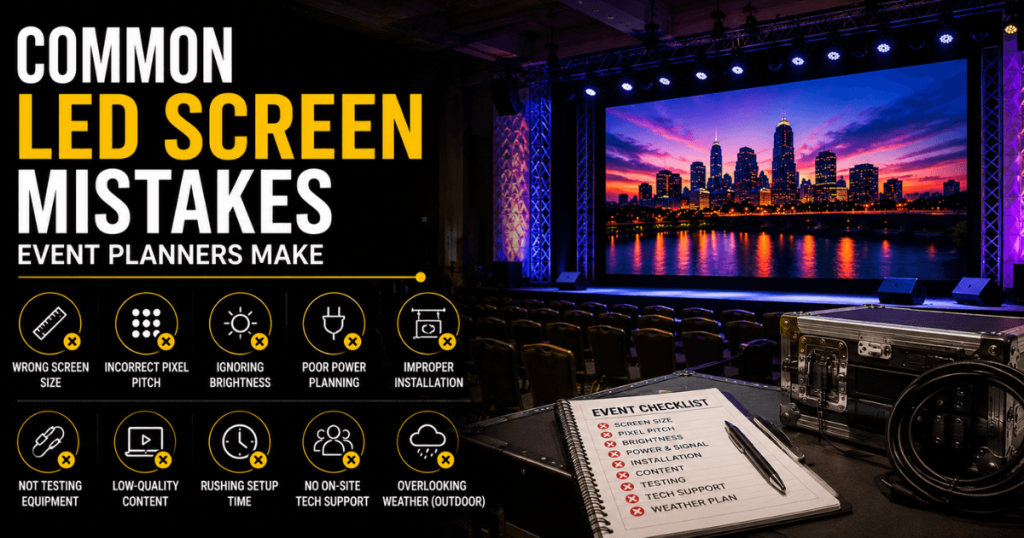
An LED screen can transform a conference, trade show, product launch, concert, or corporate event—but only when the display is selected and planned for the actual production. A screen that is too small, the wrong pixel pitch, poorly positioned, or configured for the wrong content can create problems even when the LED equipment itself is high quality.
Many event display problems begin long before installation. They occur when planners select equipment based on price alone, overlook audience viewing distances, underestimate venue logistics, or leave content testing until the last minute.
Our Toronto LED screen rental team supports conferences, corporate meetings, trade shows, exhibitions, product launches, galas, concerts, festivals, sporting events, and other productions throughout Toronto and the GTA. With 23+ years of event production experience, we approach LED planning as a complete visual-production process.
This guide covers common LED screen mistakes event planners make, why they happen, and how to avoid them.
Mistake 1: Choosing an LED Screen Based on Price Alone
The lowest LED rental quote is not always the lowest total production cost.
One supplier may quote only the LED panels. Another may include delivery, installation, processing, support structure, technical operation, and removal.
These are not equivalent packages.
A low initial price can become more expensive when essential services are added later.
How to Avoid This Mistake
Compare quotes using the same scope.
Confirm whether each includes:
LED panels and video processor
Ground support or rigging
Delivery and pickup
Installation and removal
Signal cabling
Content testing
Show-day technician
Cameras and IMAG, if required
Compare the complete installed and operated system—not just the equipment rate.
Mistake 2: Selecting the Wrong Pixel Pitch
Pixel pitch measures the distance between neighbouring LED pixels.
A smaller pitch provides greater pixel density, which can improve detailed images at close viewing distances.
Common event options include P1.9, P2.6, P2.9, and P3.9.
However, choosing the smallest pitch available is not always necessary.
A close-view financial conference may benefit from P1.9, while a large concert screen viewed from farther away may work well with P3.9.
How to Avoid This Mistake
Start with the closest important viewing position and the content being displayed.
Pixel Pitch | General Application |
|---|---|
P1.9 | Very close viewing and detailed presentations |
P2.6 | Conferences, trade shows, and corporate events |
P2.9 | Medium-distance viewing and larger stages |
P3.9 | Larger displays and longer viewing distances |
These are starting points rather than fixed rules. The exact LED product, screen dimensions, and viewing conditions should determine the final choice.
Mistake 3: Choosing an LED Wall That Is Too Small
A small screen can look impressive during an empty-room demonstration but become difficult to see once the audience arrives.
This is especially common in deep ballrooms and large conference halls.
A high-resolution LED wall does not solve the problem if the physical image is too small for people at the back.
How to Avoid This Mistake
Measure the farthest important viewing distance.
For presentation-heavy events, a preliminary sizing guideline is:
Screen Height ≈ Farthest Viewing Distance ÷ 6 to 8
This can establish a starting point, but the final size must also account for content, audience layout, screen elevation, and venue dimensions.
For a deep or wide audience, consider whether additional side screens would improve visibility.
Mistake 4: Choosing a Screen That Is Unnecessarily Large
Bigger is not always better.
An oversized LED wall can:
Overwhelm a small stage
Increase rental cost
Require more support equipment
Increase labour
Complicate venue logistics
Reduce space for presenters and scenic elements
A large screen may also be unnecessary if the audience is relatively close.
How to Avoid This Mistake
Match the screen to the room and content.
Consider the audience width, depth, stage dimensions, and intended visual layout before confirming the display size.
The goal is sufficient visibility—not maximum LED area.
Mistake 5: Ignoring the Closest and Farthest Viewers
Event planners sometimes select a screen using only audience count.
But 500 people seated in a wide ballroom have different viewing requirements from 500 people in a long, narrow hall.
Two measurements are especially useful:
Closest Viewer → Helps Determine Pixel Pitch
Farthest Viewer → Helps Determine Physical Screen Size
Ignoring either measurement can lead to a display that performs well for one part of the audience but poorly for another.
How to Avoid This Mistake
Review the seating plan and identify the closest, average, and farthest viewing positions.
Use those measurements to evaluate both pixel pitch and physical screen dimensions.
Mistake 6: Using Indoor LED for an Outdoor Event
Indoor and outdoor LED screens are designed for different environments.
An indoor LED wall may provide excellent close-view image quality but lack the environmental protection and brightness required outdoors.
Outdoor events can introduce:
Daylight
Rain and moisture
Wind
Temperature changes
Different structural requirements
How to Avoid This Mistake
Use equipment suitable for the operating environment.
For outdoor events, review the screen’s environmental rating, brightness, structural requirements, and site conditions with the production team.
Do not assume a fine-pitch indoor wall is appropriate outdoors simply because its image quality is excellent.
Mistake 7: Ignoring Brightness Requirements
Brightness affects how well the audience can see the display.
A screen that looks excellent in a dark warehouse may perform very differently in a sunlit outdoor location.
However, excessive brightness can also be a problem indoors.
An overly bright LED wall may:
Distract attendees
Compete with stage lighting
Make presenters appear comparatively dark on camera
Create visual discomfort
How to Avoid This Mistake
Match brightness to the event environment.
For outdoor events, consider daylight, screen orientation, and the time of day.
For indoor events, balance the LED wall with ambient lighting, stage lighting, and camera exposure.
Mistake 8: Forgetting About Audience Sightlines
A correctly sized LED wall can still perform poorly if it is installed too low or positioned at an awkward angle.
Attendees, cameras, stage furniture, and scenic elements may block part of the display.
This becomes particularly important in large seated audiences.
How to Avoid This Mistake
Review:
Stage height
Bottom edge of the screen
Audience depth
Seating arrangement
Camera positions
Screen elevation
For some events, a properly elevated ground-supported wall is sufficient. Others may benefit from a flown display or additional side screens.
Mistake 9: Choosing Ground Support or Rigging Too Late
The installation method can affect the entire production design.
A ground-supported LED wall needs an appropriate footprint. A truss-hung LED wall requires suitable approved rigging conditions.
Leaving this decision until late in planning can create problems with stage space, structural coordination, labour, and scheduling.
How to Avoid This Mistake
Determine the installation method during the initial production design.
Evaluate:
Requirement | Ground Supported | Truss-Hung |
|---|---|---|
Available Floor Space | Requires footprint | Can preserve floor space |
Screen Elevation | Structure-dependent | Greater positioning flexibility |
Venue Rigging | Often unnecessary | Typically required |
Installation Complexity | Often lower | Usually higher |
Cost | Often lower | Often higher |
The final choice should follow the venue’s structural requirements and the production’s sightline needs.
Mistake 10: Treating the LED Wall as Standalone Equipment
An LED wall is part of a larger video system.
The panels alone do not provide the complete production.
Depending on the event, the system may also require:
Video processor
Presentation switcher
Media server
Signal distribution
Cameras
Playback computers
Monitoring
Professional technicians
How to Avoid This Mistake
Plan the complete signal workflow:
Content Source → Switching / Playback → LED Processor → LED Wall
For events with IMAG or livestreaming, include the camera and production systems in the design from the beginning.
Mistake 11: Forgetting Native Resolution
A modular LED wall does not automatically have a native resolution of 1920 × 1080.
Its resolution depends on the pixel pitch, cabinet specifications, and number of cabinets used.
For example, a custom ultra-wide wall may have a canvas that differs significantly from a standard television format.
How to Avoid This Mistake
Confirm the final LED canvas before preparing show content.
Coordinate with the video team on:
Native resolution
Aspect ratio
Content scaling
Playback format
Content zones
Standard video and presentation sources can often be processed for custom canvases, but they should be tested before the event.
Mistake 12: Preparing PowerPoint Without Considering the LED Screen
PowerPoint is one of the most common sources of event display problems.
A slide may look excellent on a laptop but become difficult to read from the back of a ballroom.
Typical issues include:
Small fonts
Dense tables
Too many charts
Low-contrast colours
Incorrect aspect ratio
Text positioned too close to the edges
How to Avoid This Mistake
Design presentations for the audience, not the presenter’s laptop.
Use:
Large headings
Readable body text
Simple charts
High contrast
Limited text
Clear visual hierarchy
Test the actual presentation on the final LED configuration whenever possible.
Mistake 13: Ignoring Cameras and IMAG
IMAG—Image Magnification—uses live cameras to show presenters or performers on large screens.
For large conferences, concerts, award ceremonies, and graduations, IMAG can be essential to audience visibility.
Without it, attendees far from the stage may struggle to see facial expressions and important details.
How to Avoid This Mistake
Determine whether the event needs:
One or more cameras
Camera operators
Video switching
IMAG displays
Recording
Livestreaming
The LED wall should be selected and configured alongside the camera system.
Mistake 14: Ignoring LED Performance on Camera
A screen can look good to the human eye but require adjustment for professional video capture.
Camera-related issues can involve:
Refresh performance
Exposure
Brightness
Colour balance
Stage lighting
Camera settings
How to Avoid This Mistake
Include camera testing in the rehearsal.
The video and lighting teams should check how the LED wall appears in the actual camera feeds, not only how it looks from the audience.
Mistake 15: Choosing the Wrong Aspect Ratio
Many planners assume every LED wall must be 16:9.
That format is useful for standard PowerPoint, video, and camera feeds, but modular LED can support many other shapes.
An ultra-wide wall may be more suitable for a product launch or scenic conference backdrop.
However, custom dimensions require appropriate content planning.
How to Avoid This Mistake
Choose the aspect ratio according to the intended content.
For example:
16:9 → Standard presentations and videos
Ultra-Wide → Scenic backdrops and multiple content zones
Vertical → Signage and selected creative applications
Do not finalize a custom LED shape without confirming how content will be displayed.
Mistake 16: Leaving Content Testing Until the Event Starts
Last-minute content problems can disrupt an otherwise well-planned production.
Potential issues include:
Incorrect resolution
Unsupported video formats
Missing media
Unexpected scaling
Cropped graphics
Incorrect source routing
Presentation transitions that have not been tested
How to Avoid This Mistake
Schedule a content test before doors open.
Verify the actual files, playback systems, presentation computers, switching workflow, and LED processor configuration.
For high-profile events, include a rehearsal with the real show content.
Mistake 17: Underestimating Venue Logistics
An LED wall that fits on the stage may still be difficult to deliver and install.
Venue logistics can affect:
Truck access
Loading docks
Freight elevators
Equipment movement
Installation windows
Overnight labour
Storage space
Strike schedules
How to Avoid This Mistake
Provide the venue name, room, event schedule, and access information before requesting the final quote.
Coordinate with the venue and production team early, especially for large displays or complex installations.
Mistake 18: Not Allowing Enough Installation Time
LED installation involves more than assembling cabinets.
The complete process can include support installation, panel assembly, power and data distribution, processing, alignment, testing, and final checks.
Large or flown systems may require additional coordination with rigging, lighting, audio, and staging.
How to Avoid This Mistake
Build a realistic production schedule that includes:
Delivery and load-in
Support-system preparation
LED installation
Video configuration
Content testing
Rehearsal
Live operation
Strike and removal
Avoid scheduling the first full system test immediately before the audience arrives.
Mistake 19: Underestimating LED Screen Power Requirements
A large LED wall requires a properly planned electrical supply. The total power requirement depends on the LED product, screen dimensions, brightness settings, and supporting equipment.
One common mistake is assuming that a large LED wall can operate from a few standard wall outlets.
This can lead to overloaded circuits, insufficient power distribution, or last-minute changes to the production plan.
How to Avoid This Mistake
Ask the LED rental provider to confirm:
Expected and maximum system power requirements
Available venue power
Required electrical connections
Power distribution equipment
Cable routes
Power requirements for processors and other video equipment
For outdoor events, confirm whether venue power or an appropriately sized generator will be used.
Electrical planning and connections should be handled by qualified personnel.
Mistake 20: Forgetting About Signal Distribution
An LED wall needs a reliable path from the content source to the display.
For a simple meeting, that may involve a presentation computer and LED processor.
A larger production may include multiple computers, cameras, playback systems, switchers, and distributed displays.
Problems can occur when planners underestimate cable distances or assume every source can connect directly to the LED wall.
How to Avoid This Mistake
Create a signal plan before installation.
A typical conference workflow might be:
Presentation Computers + Cameras + Playback → Video Switcher → LED Processor → LED Wall
Confirm the required connections, signal formats, cable routes, and equipment locations.
For important events, discuss backup source and signal options with the production team.
Mistake 21: Not Planning for Backup Equipment
A live event may depend on a single presentation computer, video source, or signal path.
If that component fails, the screen may temporarily lose its intended content even though the LED panels are working correctly.
Not every event needs a fully redundant video system, but critical productions should evaluate their failure points.
How to Avoid This Mistake
For high-profile events, consider appropriate backup arrangements for:
Presentation computers
Playback content
Signal connections
Processing equipment
Power, where required and feasible
The level of redundancy should match the event’s operational requirements and budget.
Mistake 22: Using One Screen When the Audience Needs Multiple Displays
A single large LED wall may not provide good visibility for every attendee.
This is particularly common in:
Wide conference halls
Deep ballrooms
Large conventions
Concerts
Award ceremonies
Sporting events
Attendees seated far to the side may have an uncomfortable viewing angle, while those at the back may struggle to see the presenter.
How to Avoid This Mistake
Review audience width and depth before selecting the screen configuration.
Possible solutions include:
Audience Layout | Possible Display Configuration |
|---|---|
Small, shallow room | One main LED wall |
Wide ballroom | Main LED wall with side displays |
Deep conference hall | Elevated main screen and supporting IMAG |
Large concert | Main scenic LED with side IMAG screens |
Multiple event areas | Distributed displays |
Adding screens should solve a specific visibility problem rather than simply increase the amount of equipment.
Mistake 23: Ignoring Outdoor Weather and Wind Planning
Outdoor LED screens introduce structural and environmental considerations that do not apply in the same way to protected indoor installations.
An outdoor screen presents a substantial surface area that can be affected by wind. Rain, ground conditions, and temperature can also influence equipment selection and installation.
How to Avoid This Mistake
Coordinate outdoor LED planning with qualified production and structural professionals.
Confirm:
Suitable outdoor-rated equipment
Appropriate support or rigging
Wind and weather requirements
Ground conditions
Ballast or anchoring, where applicable
Weather-monitoring responsibilities
Event-specific operational and shutdown procedures
Never assume that an indoor support configuration can be used outdoors without a suitable design.
Mistake 24: Positioning an Outdoor LED Screen Against Direct Sunlight
A high-brightness outdoor LED wall can still face visibility challenges when the screen orientation is poorly planned.
Direct sunlight, audience position, and time of day all affect the viewing experience.
How to Avoid This Mistake
Review the event schedule and screen orientation.
Consider where the sun will be during the main program and whether the audience will be viewing the display in direct daylight.
Select a suitable outdoor LED product and brightness capability for the conditions.
Mistake 25: Forgetting the Event’s Full Operating Schedule
An LED rental may be required for longer than the live event itself.
The actual schedule can include:
Installation
Technical testing
Rehearsals
Client previews
Event operation
Overnight standby
Removal
A planner may request pricing for a one-day event without accounting for an installation day or an additional rehearsal.
How to Avoid This Mistake
Provide the complete schedule when requesting a quote.
For example:
Activity | Example Schedule |
|---|---|
Load-in and installation | Day 1 |
Rehearsal | Day 1 |
Live event | Day 2 |
Equipment removal | After event or Day 3 |
This is an illustrative schedule. Actual timing depends on the venue, screen size, production complexity, and event requirements.
Mistake 26: Not Confirming Who Will Operate the LED System
Some events need only a relatively simple playback arrangement.
Others require a dedicated video technician throughout the show.
A common mistake is assuming installation labour also includes full live-event operation.
How to Avoid This Mistake
Confirm the supplier’s responsibilities.
Ask who will manage:
LED processor settings
Source switching
Presentation changes
Video playback
IMAG feeds
Troubleshooting
Content adjustments
For complex productions, establish clear responsibilities between the LED provider, video director, camera team, and event producer.
Mistake 27: Making Major Screen Changes at the Last Minute
Changing the screen dimensions or layout after the production plan is finalized can affect several other departments.
For example, switching from a 16:9 wall to an ultra-wide backdrop may require changes to:
LED equipment quantities
Support structure
Video processing
Content dimensions
Stage layout
Power distribution
Labour
Budget
How to Avoid This Mistake
Finalize the screen configuration early enough for the technical and creative teams to coordinate.
If a change is necessary, review its effect on the complete production rather than treating it as an isolated equipment adjustment.
Mistake 28: Not Reviewing the Complete LED Rental Quote
Two quotes with the same screen dimensions can describe very different systems.
One may include a fine-pitch indoor wall with a technician. Another may use a different LED product and exclude show-day operation.
How to Avoid This Mistake
Compare the following details side by side.
Quote Item | What to Confirm |
|---|---|
LED Type | Indoor or outdoor |
Pixel Pitch | Exact product specification |
Screen Dimensions | Width and height |
Native Resolution | Actual LED canvas |
Brightness | Suitability for the environment |
Support | Ground support or rigging scope |
Processing | Included equipment |
Delivery | Transport and access assumptions |
Installation | Labour and schedule |
Operation | Technician coverage |
Rental Duration | Full installation and event period |
Removal | Strike and pickup |
Additional Services | Cameras, IMAG, playback, or other equipment |
A complete quote makes it easier to compare the proposed systems and avoid unexpected costs.
Mistake 29: Not Considering Content Ownership and Responsibilities
The LED provider may supply the display system, but that does not necessarily mean the provider will create presentation slides, event graphics, videos, or animations.
This distinction is especially important for ultra-wide and creative LED configurations.
How to Avoid This Mistake
Confirm who is responsible for:
Content creation
Content resizing
Video editing
Playback file preparation
Presentation management
Final content approval
Set deadlines for receiving and testing files.
The content team should receive the final LED canvas specifications before producing custom graphics.
Mistake 30: Skipping the Final Technical Rehearsal
An LED wall may pass a basic equipment test but still encounter problems during the actual program.
For example, the event may use multiple presentation computers, live cameras, videos, and remote speakers.
Each source needs to work within the complete show workflow.
How to Avoid This Mistake
Run a technical rehearsal using the actual equipment and content.
Test:
Presentation sources
Video playback
Audio embedded in video, where applicable
Camera feeds
Source switching
Screen layouts
Content scaling
Backup arrangements
Presenter positions
Final brightness and camera settings
A rehearsal is particularly important for high-profile corporate events, award ceremonies, conferences, and livestreamed productions.
How Can Event Planners Avoid LED Screen Problems?
The most effective approach is to plan the LED wall as part of the entire event production.
Use this sequence:
Define the event and audience
Event type, venue, audience size, layout, and viewing distances.
Choose the display
Indoor/outdoor specification, screen dimensions, pixel pitch, and brightness.
Design the production
Support or rigging, power, cameras, processing, signal distribution, and content.
Confirm logistics and responsibilities
Venue access, rental duration, labour, technical operation, and complete quote.
Install, test, and rehearse
Verify the entire system before the audience arrives.
LED Screen Planning Checklist for Event Planners
Use this checklist before approving an LED rental.
Pre-event readiness
Frequently Asked Questions About LED Screen Mistakes
What is the most common LED screen mistake event planners make?
One common mistake is choosing the LED equipment before reviewing audience viewing distances, content, venue conditions, and the complete production requirements. This can result in the wrong screen size, pixel pitch, or installation approach.
Is choosing the smallest pixel pitch always better?
No. A smaller pixel pitch provides greater pixel density, but it may not offer a noticeable benefit when the audience is farther away. Match pixel pitch to viewing distance and content.
How do I know if an LED wall is too small?
Review the farthest important viewing distance, audience layout, and content. If attendees at the back cannot comfortably see presentation details or IMAG, the screen may need to be larger or supplemented with additional displays.
Can an indoor LED screen be used outdoors?
Only if the specific equipment and complete installation are suitable for the conditions. Standard indoor LED products should not be assumed to provide the environmental protection or brightness required outdoors.
Why does PowerPoint look different on an LED wall?
The LED wall may have a custom native resolution or aspect ratio. Scaling, presentation design, font sizes, and content layout can affect the final appearance. Test the presentation on the actual display system.
Do I need a technician during the event?
It depends on production complexity. Events with multiple sources, IMAG, live switching, or critical playback generally benefit from dedicated technical operation.
What should be included in an LED rental quote?
Confirm the LED product, dimensions, support structure, processing, delivery, installation, rental duration, operation, and removal. Additional services such as cameras and IMAG should be clearly identified.
Should I use one large LED wall or multiple screens?
One wall may work well for a small or moderately sized audience with good central sightlines. Wide or deep audiences may benefit from side screens or distributed displays.
How early should LED content be prepared?
The content should be ready early enough for formatting, playback checks, and rehearsal. Custom LED canvases may require additional preparation because standard 16:9 content might not fill the display as intended.
How can I reduce LED rental costs without reducing event quality?
Choose an appropriate pixel pitch, avoid unnecessary screen dimensions, finalize the design early, and compare complete rental packages. Do not remove essential structural, electrical, installation, or technical requirements simply to lower the quote.
Why Choose Our Toronto LED Screen Rental Team?
Avoiding LED screen mistakes requires more than selecting high-quality panels. The display must work with the audience, venue, content, cameras, power, support structure, and event schedule.
Our Toronto LED screen rental capabilities include:
Fine-pitch indoor LED video walls
Large-format LED screens
Outdoor LED displays
Mobile LED Trailers
Seamless and creative LED configurations
Video processing and presentation switching
Cameras and IMAG
Media playback and signal distribution
Ground-support planning and rigging coordination
Installation, testing, and rehearsal support
Live technical operation and removal
With 23+ years of event production experience, we support conferences, corporate meetings, trade shows, exhibitions, product launches, galas, award ceremonies, concerts, festivals, sporting events, weddings, and other productions throughout Toronto and the GTA.
The central lesson is simple: plan the complete LED system before booking the screen. Correct sizing, appropriate specifications, reliable infrastructure, clear responsibilities, and sufficient testing help deliver a display that works for both the audience and the production.