
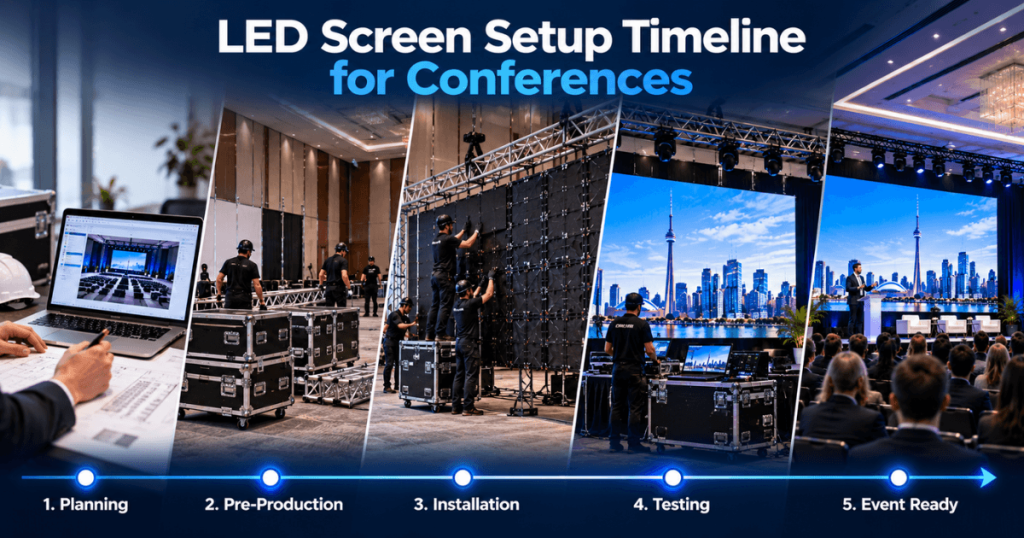
A successful conference LED screen installation starts well before the equipment arrives at the venue. Screen sizing, pixel pitch, content preparation, power, rigging, cameras, and rehearsal all need to fit into one coordinated production schedule.
For a straightforward indoor conference, the physical LED installation may take several hours. Larger productions with multiple screens, IMAG, complex rigging, or custom content can require a full load-in day or more. The actual timeline depends on the venue, equipment, crew, and production requirements.
Our Toronto LED screen rental team supports corporate conferences, medical conferences, technology events, association meetings, conventions, and general sessions throughout Toronto and the GTA. With 23+ years of event production experience, we plan LED systems around the complete conference schedule—from the initial site review through installation, rehearsal, live operation, and removal.
This guide explains how to build a realistic LED screen setup timeline and avoid last-minute production problems.
How Long Does It Take to Set Up an LED Screen for a Conference?
There is no universal installation time. A small, ground-supported LED wall may take only a few hours to assemble and configure, while a large flown system with multiple displays may require considerably longer.
The following ranges are illustrative planning estimates, not guaranteed installation times.
Conference LED Configuration | Preliminary Setup Allowance |
|---|---|
Small, straightforward indoor LED wall | 2–4 hours |
Medium conference LED wall | 4–6 hours |
Large main-stage LED wall | 6–10 hours |
Multiple LED walls with IMAG | 8–12+ hours |
Complex flown or multi-screen production | Full load-in day or more |
These allowances cover different levels of complexity and should not be used as a supplier’s final schedule. Venue access, structure, electrical work, processing, testing, and crew availability can change the duration substantially.
Do not schedule the conference to begin immediately after the estimated installation ends. Allow separate time for testing and rehearsal.
What Are the Main Stages of Conference LED Setup?
A typical conference LED production follows eight stages.
Pre-production planning
Confirm screen size, venue conditions, content, cameras, power, and support requirements.
Venue access and load-in
Deliver equipment and move it to the approved installation area.
Support or rigging installation
Prepare the appropriate ground-support or approved flown system.
LED cabinet assembly
Build, align, and secure the modular LED wall.
Power and signal distribution
Connect the display, processors, playback, and other video systems.
Configuration and testing
Check the native canvas, content scaling, image quality, and sources.
Rehearsal
Test the actual presentation sequence, cameras, and show cues.
Live operation and strike
Operate the system during the conference, then remove it according to the approved schedule.
Each stage should be included in the production plan, even if some activities can take place simultaneously.
When Should Conference LED Planning Begin?
Planning should begin as soon as the venue, audience layout, and main production requirements are reasonably clear.
For a straightforward conference, several weeks of lead time may be sufficient. Larger or more complex productions may need substantially more.
A practical planning sequence is:
Planning Period | Main Activities |
|---|---|
4–8 weeks before | Venue review, screen sizing, preliminary design, budget |
2–4 weeks before | Confirm equipment, installation method, cameras, and power |
1–2 weeks before | Finalize content specifications and technical schedule |
3–7 days before | Confirm files, crew, access, source list, and rehearsal plan |
Load-in day | Install, configure, and test |
Event day | Final checks, rehearsal, and live operation |
After the event | Strike, removal, and venue handover |
These periods are planning examples. Short-notice events may be possible, while major productions can require longer preparation.
Step 1: Confirm the Conference Venue and Room Layout
The first step is to understand the actual event environment.
The production team should review:
Venue and room name
Stage dimensions
Ceiling height
Audience width and depth
Seating arrangement
Loading access
Available power
Approved rigging options
Installation and removal windows
A screen that fits within the room dimensions may still interfere with stage space, sightlines, or venue access.
Why Does This Affect the Timeline?
Venue conditions influence how the LED system can be delivered and installed.
For example, a ballroom accessible through a freight elevator may require a different load-in plan from a convention hall with direct loading-dock access.
Likewise, a flown LED wall may need additional venue and rigging coordination before installation can begin.
Step 2: Finalize the LED Screen Size and Pixel Pitch
Screen dimensions and pixel pitch should be confirmed before the final equipment and labour schedule is prepared.
The screen size affects:
Cabinet quantity
Total weight
Support requirements
Power
Signal distribution
Installation labour
Content resolution
Pixel pitch affects the display’s native resolution and close-view image quality.
For many indoor conferences, fine-pitch options such as P1.9 or P2.6 may be suitable, depending on viewing distance and content.
Why Should Screen Dimensions Be Finalized Early?
Changing the screen size can affect the support system, processor configuration, power distribution, and content layout.
A late change from a standard 16:9 wall to an ultra-wide backdrop may require substantial production adjustments.
Step 3: Decide Between Ground-Supported and Truss-Hung LED
The installation method is an important scheduling decision.
Ground-Supported LED
A ground-supported wall transfers its load through an appropriate structure to the floor or stage.
It can be practical for:
Hotel ballrooms
Corporate conferences
Association meetings
Product presentations
Standard general sessions
For suitable configurations, ground support can simplify some installation and venue-coordination requirements.
Truss-Hung LED
A flown LED wall is suspended using an approved professional rigging system.
It may be useful when:
Greater screen elevation is required
Stage space must remain clear
Audience sightlines are challenging
The screen is integrated into a larger production rig
Flown installations may require additional planning, qualified rigging personnel, venue approvals, and coordinated access.
The support method should be established before the load-in schedule is finalized.
Step 4: Coordinate LED Power Requirements
The electrical plan should be completed before equipment arrives.
LED power requirements depend on the specific product, screen area, brightness, and system configuration.
The production team should confirm:
Available venue electrical supply
Expected and maximum system power
Required distribution equipment
Electrical connection locations
Cable routes
Processor and control-system power
Qualified personnel should handle electrical planning and connections.
Insufficient power or unavailable electrical connections can delay an otherwise straightforward installation.
Step 5: Prepare the Video and Signal Plan
A conference LED wall may receive content from several sources.
These can include:
Presenter laptops
Show computers
PowerPoint
Video playback
Live cameras
Remote speakers
Sponsor content
Media servers
A typical signal workflow is:
Presentation Sources + Cameras + Playback → Video Switching → LED Processing → LED Wall
For multiple screens, the system may also require additional output routing and content layouts.
Why Is Signal Planning Important?
The video team needs to know which sources must appear on which displays.
A main LED wall might show PowerPoint while side screens display IMAG.
Without a defined signal plan, technicians may need to reconfigure equipment during installation or rehearsal.
Step 6: Prepare Content for the LED Canvas
Content should be prepared for the actual screen dimensions and native resolution.
A modular LED wall does not necessarily use a standard 1920 × 1080 canvas.
Its resolution depends on the selected cabinets and configuration.
For example, an ultra-wide conference wall may use separate content zones for:
IMAG | Presentation | IMAG
The content team should confirm:
Final canvas resolution
Aspect ratio
Video formats
Presentation dimensions
Font readability
Content zones
Playback requirements
When Should Content Be Delivered?
Ideally, the production team should receive final or near-final files several days before load-in.
The precise deadline depends on the event, particularly when custom graphics, media-server programming, or complex switching are involved.
Step 7: Schedule Equipment Delivery and Load-In
Load-in is the period when production equipment enters the venue and moves to its installation position.
The schedule should account for:
Truck arrival
Loading-dock access
Freight elevators
Equipment movement
Venue security procedures
Available crew
Other production departments
Large conferences may have lighting, audio, staging, scenic, camera, and LED crews working within the same venue.
Their activities should be coordinated to prevent access conflicts.
Step 8: Install the LED Support System
The support system is installed before or as part of the LED cabinet assembly process, according to the approved installation plan.
For ground-supported LED, this involves the appropriate supporting structure.
For flown LED, qualified rigging personnel carry out the approved overhead installation.
The exact procedure depends on the equipment and site.
Structural installation must follow applicable requirements and manufacturer specifications.
Step 9: Assemble and Align the LED Cabinets
Once the supporting arrangement is ready, technicians assemble the modular LED display.
They check:
Cabinet connections
Physical alignment
Panel security
Power and data connections
Consistent visual appearance
Larger displays require more cabinets and can take longer to assemble.
Custom shapes or multiple displays can add further complexity.
Step 10: Configure the LED Processor
The LED processor maps incoming video to the display’s actual pixel canvas.
Configuration can include:
Native resolution
Screen layout
Input signals
Scaling
Brightness
Colour settings
Output mapping
The video team should confirm that the intended content appears correctly across the complete wall.
For ultra-wide screens, this may include testing multiple content zones.
Step 11: Test PowerPoint, Video, and IMAG
Once the system is operational, each source should be tested.
Source | What to Check |
|---|---|
PowerPoint | Scaling, readability, aspect ratio |
Video Playback | Resolution, playback, correct routing |
IMAG | Camera image, framing, brightness |
Sponsor Graphics | Positioning and visibility |
Remote Speaker | Source routing and image layout |
Backup Computer | Successful source changeover |
Testing should use the actual show equipment and representative content wherever possible.
Step 12: Complete the Technical Rehearsal
The technical rehearsal confirms that the LED system works within the complete conference production.
A rehearsal may include:
Opening video
Presenter transitions
PowerPoint changes
IMAG switching
Panel discussions
Remote speakers
Sponsor graphics
Closing content
This is also the time to check how the LED wall appears on camera and whether screen brightness is balanced with stage lighting.
A successful equipment test does not replace a full show rehearsal.
Sample LED Screen Setup Timeline for a One-Day Conference
The following example assumes a medium-sized indoor conference with one main LED wall, presentation switching, and a relatively straightforward ground-supported installation.
It is an illustrative schedule, not a guaranteed production duration.
Time | Activity |
|---|---|
7:00–8:00 AM | Equipment delivery and load-in |
8:00–9:00 AM | Support-system preparation |
9:00–11:00 AM | LED assembly and cabling |
11:00 AM–12:00 PM | Processing and signal configuration |
12:00–1:00 PM | Content and source testing |
1:00–2:00 PM | Technical rehearsal |
2:00–2:30 PM | Final checks and handover |
2:30 PM onward | Doors and event, according to the show schedule |
For a morning conference, a previous-day load-in may be more appropriate.
The final schedule must also account for breaks, access restrictions, other production departments, and contingencies.
Should You Install the LED Screen the Day Before a Conference?
For a conference with an early morning start, previous-day installation is often the more practical option. It gives the production team time to assemble the display, configure the video system, test presentations, and rehearse without competing with audience arrival.
Previous-day installation is particularly useful for:
Large general sessions
Multiple LED screens
Truss-hung displays
Conferences with IMAG
Livestreamed or recorded events
Complex PowerPoint and video playback
Events involving several presenters or production departments
However, previous-day access may increase venue, labour, or rental costs. The final schedule should balance production requirements with available venue access.
Previous-Day vs Same-Day LED Screen Setup
Factor | Previous-Day Setup | Same-Day Setup |
|---|---|---|
Installation window | Usually more flexible | Often restricted |
Content testing | More time available | Must fit before doors |
Full rehearsal | Easier to schedule | May be limited |
Unexpected delays | More recovery time | Less recovery time |
Venue access cost | May be higher | May be lower |
Suitable event | Large or complex conference | Small, straightforward conference |
Early morning start | Often preferable | Requires careful planning |
Same-day setup is not inherently unsuitable. A modest ground-supported LED wall with limited video sources may be practical when the venue provides sufficient access.
The key is to schedule the work using realistic production estimates rather than assuming the equipment will be ready as soon as assembly ends.
How Much Time Should You Allow for Multiple LED Screens?
Multiple displays add complexity because each screen may have its own:
Dimensions
Pixel pitch
Native resolution
Support system
Signal requirements
Content layout
Viewing position
For example, a conference may use one large centre LED wall and two side IMAG screens.
The production team must assemble all three displays and verify that the correct content reaches each one.
A multi-screen installation may therefore require a full load-in day or longer, depending on the system.
Example: Main LED Wall With Side Screens
IMAG
MAIN LED
IMAG
Illustrative conference display arrangement. Actual screen dimensions and positioning depend on the venue and audience.
The centre screen can display presentations, while the side screens provide live camera views of presenters.
Each display should be tested independently and as part of the complete show.
How Does IMAG Affect the Conference Setup Timeline?
IMAG stands for Image Magnification. It uses live cameras to display presenters, performers, or panel discussions on large screens.
Adding IMAG can require:
Camera installation
Camera positioning
Camera cabling
Video switching
LED processor configuration
Camera and lighting adjustments
Technical rehearsal
The LED and camera teams should coordinate before the event.
What Should Be Tested?
The rehearsal should verify:
Presenter framing
Camera transitions
Image routing to each screen
LED brightness on camera
Colour consistency
Presenter and stage lighting
Live switching cues
IMAG should be treated as a complete video-production requirement, not simply another input connected to the LED wall.
How Does Livestreaming Affect the Timeline?
A livestreamed conference may require additional coordination between the in-room LED system and the streaming production.
The two systems may share sources, but their output requirements can differ.
For example, the main LED wall may show an ultra-wide presentation layout while the livestream uses a standard 16:9 program feed.
The technical team should confirm:
Which sources feed the LED wall
Which sources feed the livestream
Camera and presentation layouts
Audio-video synchronization
Playback routing
Backup arrangements
Allow sufficient rehearsal time to verify both the in-room display and the remote viewing experience.
How Long Does It Take to Set Up a Truss-Hung LED Wall?
A truss-hung LED installation can take longer than a comparable straightforward ground-supported system because it requires overhead rigging coordination.
The schedule may include:
Venue rigging preparation
Truss and hoist installation
LED cabinet assembly
Controlled lifting and positioning
Power and data connections
System inspection
Video configuration
Content testing
The duration depends on screen dimensions, weight, venue conditions, rigging design, and crew availability.
Do not estimate flown LED installation time from panel assembly alone.
Qualified rigging professionals and the venue’s approved procedures must determine the appropriate installation sequence.
What Can Delay a Conference LED Screen Installation?
Several common problems can disrupt the setup schedule.
Potential Delay | Why It Happens | Prevention |
|---|---|---|
Late venue access | Room unavailable | Confirm access in writing |
Incorrect screen dimensions | Design changed | Finalize layout early |
Unavailable power | Electrical plan incomplete | Confirm power requirements |
Rigging restrictions | Venue requirements not reviewed | Coordinate before load-in |
Missing content | Files delivered late | Set content deadlines |
Incorrect aspect ratio | Canvas not confirmed | Share native resolution |
Signal problems | Sources or routing not tested | Prepare a signal plan |
Production conflicts | Crews need the same space | Coordinate department schedules |
Limited rehearsal time | Setup ends too close to doors | Protect a testing window |
A realistic timeline includes time to resolve minor issues without affecting the audience.
How Should LED, Audio, Lighting, and Staging Be Scheduled?
Large conferences often involve several production departments working in the same space.
The LED installation should be coordinated with:
Staging
Scenic
Rigging
Lighting
Audio
Cameras
Event operations
For example, a ground-supported LED wall may need to be installed after the stage is ready.
A flown LED wall may require coordinated overhead work before other departments can occupy certain areas.
The exact order depends on the approved production plan.
Who Should Coordinate the Schedule?
For complex events, a designated production manager or technical director should maintain the master load-in and rehearsal schedule.
Each department should know when it can access the stage and when its equipment must be ready.
When Should PowerPoint and Video Files Be Finalized?
The content deadline should be early enough to allow formatting, testing, and necessary corrections.
For a straightforward conference, receiving near-final files several days before the event can be helpful.
More complex productions may require earlier deadlines, especially when content includes:
Custom ultra-wide graphics
Multiple content zones
Media-server playback
Complex animations
Extensive sponsor content
Multiple presentation sources
Recommended Content Workflow
Confirm LED Canvas → Prepare Content → Review Files → Test Playback → Rehearse → Final Approval
Late content changes may still be possible, but they should be reviewed for their effect on the show workflow.
Should the LED Wall Be Tested Before Rehearsal?
Yes.
Technical testing and show rehearsal serve different purposes.
Technical Testing
Confirms that the equipment and sources work correctly.
Typical checks include:
Panel operation
Processor configuration
Source routing
Resolution
Scaling
Brightness
Video playback
Show Rehearsal
Confirms that the complete conference program runs as intended.
This includes:
Presenter transitions
Presentation changes
IMAG cues
Video playback
Remote speakers
Opening and closing sequences
Both should be included in the production schedule.
What Should Happen on Conference Day?
If the LED system was installed the previous day, event-day preparation should focus on final verification and operation.
A typical sequence is:
Power on and inspect the display.
Confirm video sources and processing.
Check presentation computers.
Verify playback files.
Test cameras and IMAG.
Confirm brightness and camera settings.
Complete the final rehearsal.
Prepare for audience arrival.
Operate the system during the event.
The exact order should follow the production team’s approved show schedule.
Who Should Operate the LED Screen During the Conference?
The required crew depends on the complexity of the event.
A simple conference may need a technician to manage the LED system and presentation sources.
A larger event may require separate roles for:
LED system operation
Presentation management
Video switching
Media playback
Cameras
Technical direction
Responsibilities should be defined before the event.
The person installing the LED wall is not necessarily responsible for every live show cue.
How Much Time Should Be Allowed for LED Screen Removal?
Removal, also called strike, is part of the complete rental schedule.
The process can include:
Power-down
Cable removal
LED cabinet disassembly
Support-system removal
Equipment packing
Loading
Venue handover
A small, straightforward system may be removed within several hours.
Large or flown systems can require substantially more time, particularly when other production departments share the same strike window.
Why Is Strike Planning Important?
Venues may impose specific removal deadlines.
If the equipment cannot be removed within the approved window, additional venue or labour costs may arise.
Confirm the strike schedule before booking the rental.
Sample Timeline: Small Corporate Conference
Event: 100–150 attendees Display: One ground-supported indoor LED wall Content: PowerPoint and video Production: Straightforward presentation workflow
Activity | Planning Allowance |
|---|---|
Load-in | 45–60 minutes |
Support and LED assembly | 2–3 hours |
Processing and source setup | 45–60 minutes |
Testing | 30–60 minutes |
Rehearsal | 30–60 minutes |
A suitable same-day setup may be possible if the venue provides enough access before the conference.
The final schedule must be confirmed with the supplier.
Sample Timeline: Medium Conference With IMAG
Event: 300–500 attendees Display: Main LED wall with cameras Content: PowerPoint, video, IMAG Production: Multiple sources and live switching
Activity | Planning Allowance |
|---|---|
Load-in and staging coordination | 1–2 hours |
LED installation | 3–5 hours |
Video and camera configuration | 1–2 hours |
System testing | 1 hour |
Technical rehearsal | 1–2 hours |
For an early morning event, previous-day installation may provide a more practical schedule.
Some tasks may run concurrently when crew, access, and safety conditions allow.
Sample Timeline: Large Conference With Multiple LED Screens
Event: 1,000+ attendees Display: Main LED wall and side IMAG screens Content: Presentations, video, live cameras, sponsor graphics Production: Complex multi-department setup
Phase | Preliminary Allowance |
|---|---|
Rigging and production preparation | Project-dependent |
LED assembly and installation | Several hours to a full shift |
Processing and signal configuration | Several hours |
Camera and lighting coordination | Additional scheduled time |
Full technical rehearsal | Dedicated rehearsal window |
A full load-in day or more may be appropriate.
The production team should establish a project-specific schedule after reviewing the venue, screen specifications, rigging, and other departments.
Frequently Asked Questions About Conference LED Screen Setup
How long does it take to install an LED wall for a conference?
A small, straightforward wall may take several hours. Larger systems with multiple screens, rigging, cameras, and complex processing can require a full load-in day or longer. The supplier should confirm the project-specific schedule.
Can an LED screen be installed on the same day as the conference?
Yes, for suitable configurations with sufficient venue access. However, the schedule must include installation, configuration, testing, and rehearsal before audience arrival.
Is it better to install the LED screen the day before?
Previous-day installation often provides more time for testing and rehearsal, especially for early morning or complex conferences. It may also introduce additional venue or labour costs.
Does a truss-hung LED screen take longer to install?
It can. Flown systems generally require additional rigging coordination and qualified personnel. The actual duration depends on the venue, screen, rigging plan, and crew.
How much time should be allowed for LED testing?
Testing time depends on the number of displays and sources. A simple setup may need a relatively short testing window, while multi-screen and IMAG productions need more extensive checks.
When should PowerPoint files be submitted?
Provide final or near-final files early enough for content review and testing. Several days before the event can be helpful for straightforward conferences; complex custom content may need a longer lead time.
Does IMAG increase setup time?
Yes. IMAG introduces camera installation, video switching, signal routing, and camera-related testing and rehearsal.
Can LED installation happen while other production crews are working?
Some activities can run concurrently, but the sequence must be coordinated. Rigging, staging, lighting, audio, and LED crews may require controlled access to shared work areas.
How long does LED screen removal take?
A small system may be removed within several hours. Large or flown systems can require longer, depending on the installation, venue access, and other production departments.
What information is needed to create an accurate LED setup schedule?
Provide the venue, room, stage dimensions, audience layout, screen size, installation method, content requirements, camera needs, available power, load-in window, event start time, and removal deadline.
Why Choose Our Toronto LED Screen Rental Team?
Conference LED production involves more than delivering and assembling a display. The system must be ready for presentations, video, cameras, rehearsals, and the live program.
Our Toronto LED screen rental capabilities include:
Fine-pitch indoor LED video walls
Large-format conference displays
Ground-supported LED systems
Rigging coordination for flown LED
Video processing and presentation switching
Cameras and IMAG
Media playback and signal distribution
Content testing
Installation and removal
Rehearsal support
Live technical operation
With 23+ years of event production experience, we support corporate conferences, medical conferences, technology events, association meetings, conventions, general sessions, and other productions throughout Toronto and the GTA.
A successful LED setup timeline should protect three distinct stages: installation, technical testing, and rehearsal. Planning each stage separately helps ensure the display is ready before the audience arrives and remains supported throughout the conference.